
Automation sounds like the answer.
Reduce manual work. Connect systems. Eliminate spreadsheets. Let software handle repetitive tasks.
But there is a problem.
Automation doesn't automatically make a business more efficient.
If a process requires five approvals, three spreadsheets, two systems, and a person whose job is essentially to copy information from one place to another, putting that process into software does not solve the underlying problem.
It simply makes the mess faster.
That is why business process simplification should come before ERP automation.
The Automation Trap
Faster doesn't always mean better
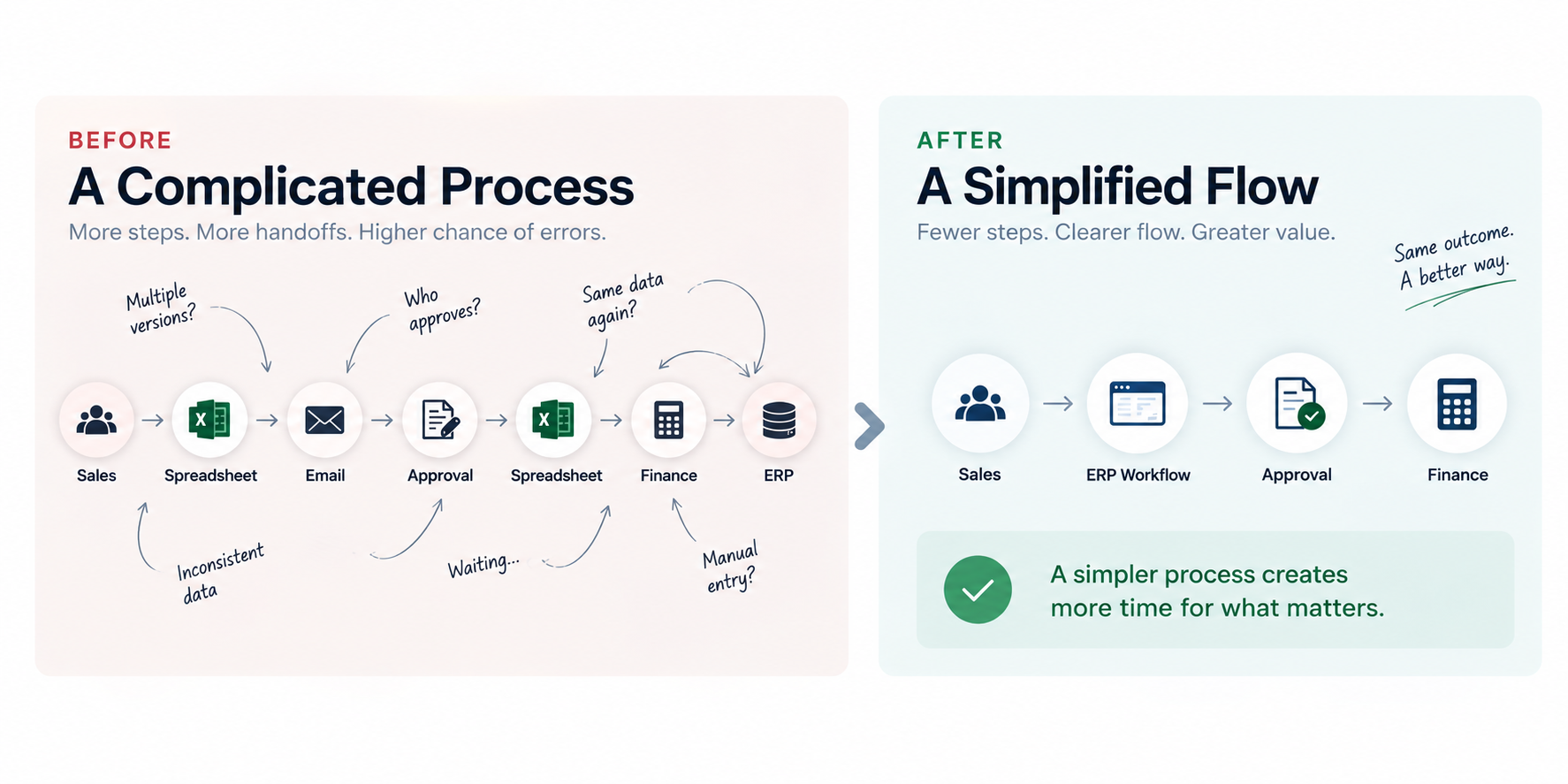
Imagine a sales process that looks like this:
Sales → Spreadsheet → Email → Approval → Spreadsheet → Finance → ERP
Every step may have a reason.
Someone needs to check the price.
Someone else needs to approve the discount.
Finance needs the information.
Another employee enters it into the ERP.
The process works.
But does it need to work this way?
Now imagine the process after simplification:
Sales → ERP Workflow → Approval → Finance
The technology did not create the improvement.
The process was improved first. Technology simply made the improved process easier to execute.
Digital doesn't automatically mean efficient
Moving a manual form into a digital form is not necessarily transformation.
Neither is replacing a spreadsheet with a system that still requires the same information to be entered three times.
A process can be completely digital and still be unnecessarily complicated.
The important question is not:
“Can we automate this?”
It is:
“Should this process work this way in the first place?”
Why companies reproduce old processes in new systems
As explored in why ERP implementations can fail even when the software itself is capable, ERP implementations often reveal an uncomfortable truth: businesses sometimes ask new systems to reproduce processes that were created years ago for reasons nobody remembers anymore.
An approval may exist because it was once necessary.
A spreadsheet may exist because an old system could not produce the required report.
A manual reconciliation may exist because two systems could not communicate.
Over time, these workarounds become “the way we do things.”
When a new ERP arrives, they can accidentally become requirements.
That is how an organization ends up with a new system running an old process.
Where Business Processes Become Complicated
Process complexity rarely comes from one major decision.
It usually accumulates over time.
Too many approval layers
More approvals do not automatically mean better control.
Sometimes they simply create waiting time.
The question should be whether each approval adds meaningful business value, risk control, or accountability.
Duplicate data entry
If the same customer, product, order, or transaction information has to be entered repeatedly, the process is creating unnecessary work — and additional opportunities for errors.
Manual reconciliation
When employees regularly compare information between spreadsheets, systems, or reports, the problem may not be the employee.
The process or system landscape may be creating the need for reconciliation in the first place.
Spreadsheet dependency
Spreadsheets are not inherently bad.
They are often useful tools.
The problem begins when critical operational processes depend on spreadsheets because the underlying process or system cannot provide a reliable way of working.
Unclear ownership
A process can involve Sales, Operations, Warehouse, Purchasing and Finance without anyone clearly owning the process from beginning to end.
When something goes wrong, everyone owns a piece of it — but nobody owns the outcome.
Systems that don't communicate
When information has to be manually moved between systems, employees become the integration layer.
That may work at a small scale.
It becomes increasingly difficult to manage as the business grows.
Simplify Before You Automate
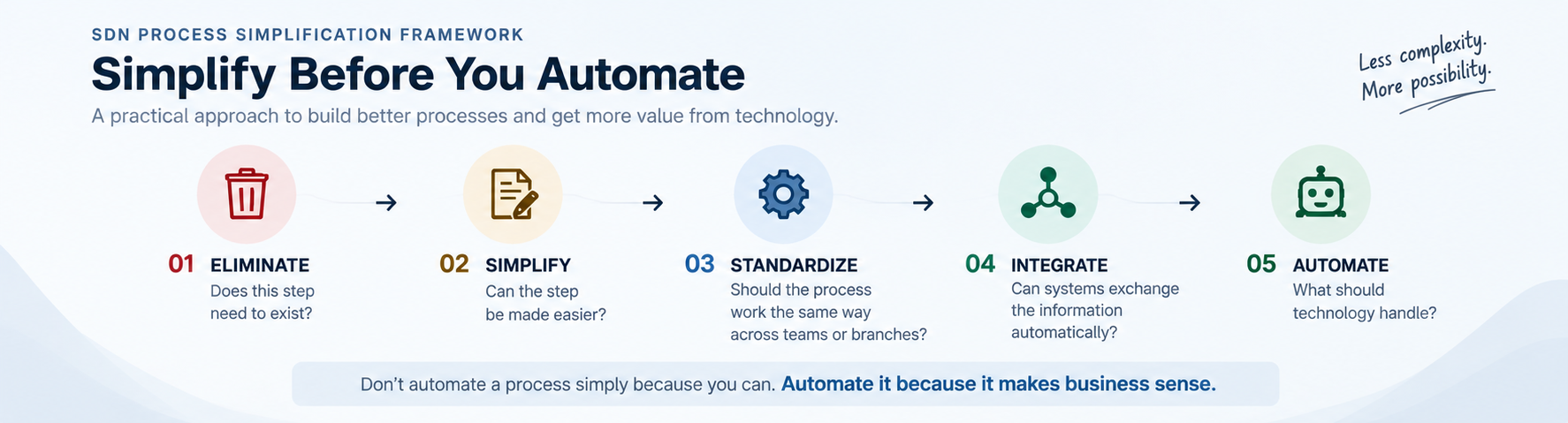
A practical way to approach process improvement is to ask five questions before reaching for automation.
1. Eliminate
Does this step need to exist?
Remove activities that do not provide meaningful value, control, or information.
Not every historical step deserves to survive simply because it has always been there.
2. Simplify
Can the step be made easier?
Reduce unnecessary forms, handoffs, approvals, calculations, or duplicate activities.
A simpler process is often easier to train, manage, measure, and automate.
3. Standardize
Should the process work the same way across teams or branches?
Some differences are necessary.
Others exist simply because different teams developed different habits.
Standardizing the right parts of a process can improve consistency while still allowing legitimate business exceptions.
4. Integrate
Can systems exchange information automatically?
Once the process itself is clear, look at how information should move.
The goal is to reduce unnecessary re-entry and create a more reliable flow of information between business functions.
5. Automate
Only now: what should technology handle?
Automation is powerful when it is applied to a process that already makes sense.
It can reduce repetitive work, improve consistency, speed up approvals, and give employees more time to focus on decisions that actually require human judgment.
This is the difference between automating a process and automating a problem.
Don't Confuse Legacy Habits with Business Requirements
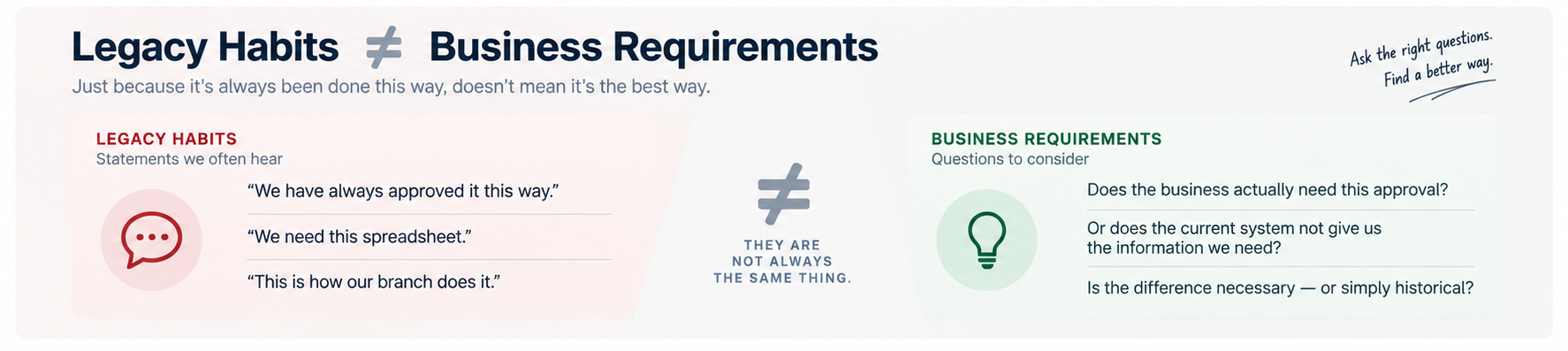
One of the most important questions in process improvement is surprisingly simple:
Why do we do it this way?
Consider two common answers:
“We have always approved it this way.”
That does not necessarily mean:
“The business requires this approval.”
Or:
“We need this spreadsheet.”
That may actually mean:
“Our current system doesn't give us the information we need.”
These distinctions matter.
A business requirement describes what the business genuinely needs.
A legacy habit describes how the business has learned to achieve it.
They are not always the same thing.
This is particularly important during ERP implementation. The implementation team should understand the current process, but that does not mean every part of the current process should automatically become the future-state design.
A good transformation asks:
What should we keep? What should we change? What should we remove?
What Business Process Simplification Can Deliver
Simplification is not about making processes look cleaner on a diagram.
It should produce measurable business benefits.
A well-designed process can help deliver:
- Fewer manual steps
- Faster decision-making
- Better visibility
- Fewer opportunities for errors
- Clearer accountability
- Less dependency on individual workarounds
- Better use of ERP and automation
- A stronger foundation for future growth
Research from Indonesia has similarly identified opportunities to improve ERP-related processes through approaches such as simplifying documents, running suitable activities in parallel, and automating verification and validation.
The point is not to automate everything.
The point is to create a process where automation actually makes sense.
From Process Complexity to Business Clarity
The best technology implementation cannot compensate indefinitely for a business process that nobody understands.
Before choosing what to automate, understand how the work actually happens.
Before configuring the ERP, decide how the business should operate.
Before adding another system, ask whether the existing process can be simplified.
And before preserving an exception, ask why it exists.
This is where business process simplification becomes more than an efficiency exercise.
It becomes a foundation for business transformation.
Understand → Simplify → Deliver → Enable
Understand the business and how work actually happens.
Simplify what does not need to be complicated.
Deliver practical improvements that people can actually use.
Then enable the business with technology.
Because the goal of ERP is not to make complicated processes digital.
The goal is to help the business work better.