
Sometimes the Most Expensive ERP Decision Is Replacing the Right System for the Wrong Reason
ERP decisions often begin with a simple question:
“How much does this ERP cost?”
But that question can be misleading.
We encountered a situation where a company was considering replacing an ERP system it had already been using successfully since 2018.
The existing system was stable. Users were already familiar with it. Business processes had been established around it. Historical data was already inside the system, and the organization had accumulated years of experience operating it.
The proposed alternative appeared cheaper.
At first glance, the calculation seemed straightforward:
Lower software cost = lower ERP cost.
But ERP decisions rarely work that way.
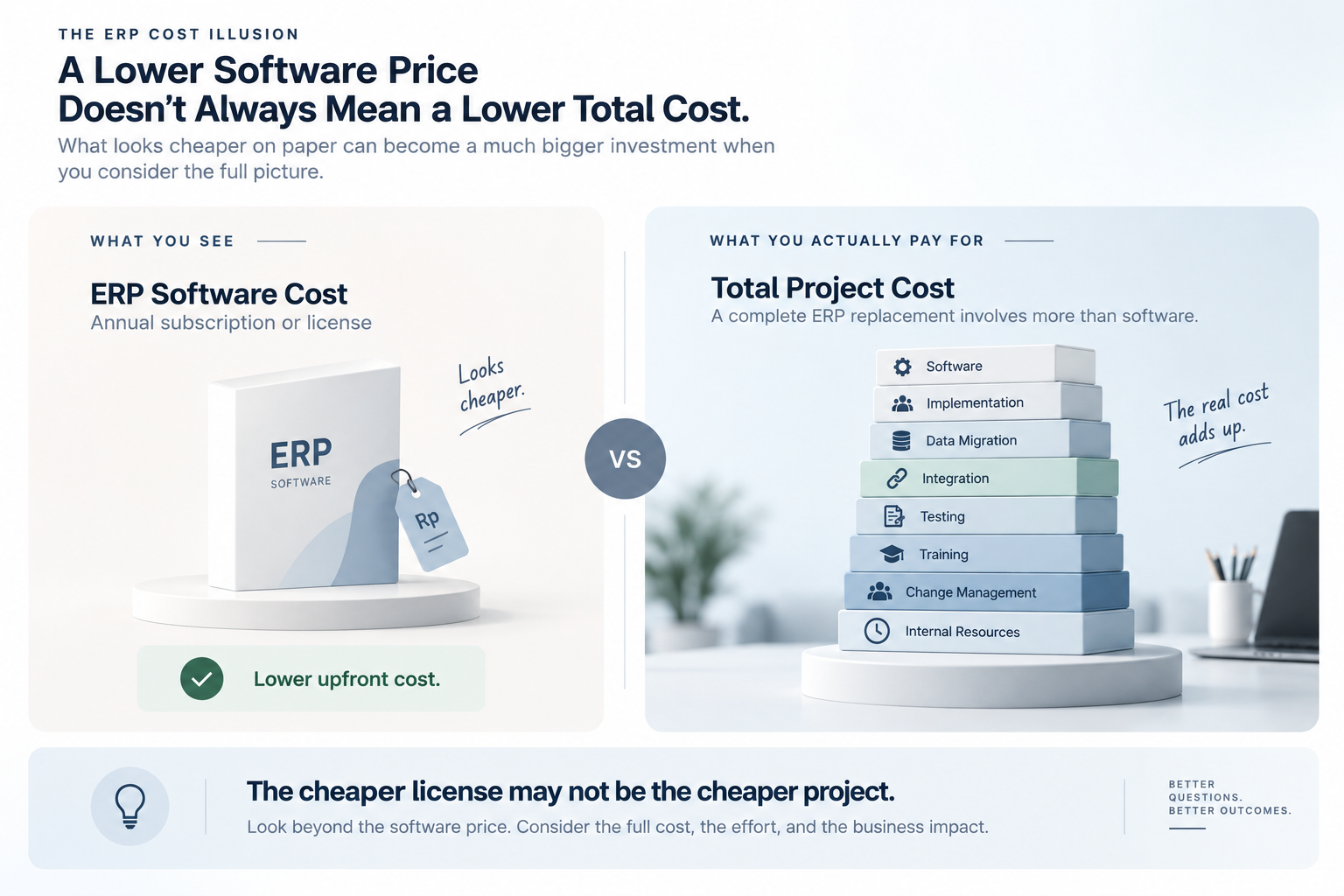
A replacement is not simply the purchase of another piece of software. It can involve implementation, configuration, data migration, testing, reporting, integration, user training, process changes, change management, and significant internal effort.
SAP's ERP ROI guidance, for example, recommends evaluating the total cost of ownership of both the existing and replacement systems rather than comparing software prices alone. Its framework includes infrastructure, software, implementation, and ongoing personnel costs, and recommends considering costs and benefits over a multi-year period.
That changes the question completely.
Instead of asking:
“Which ERP is cheaper?”
the better question becomes:
“Which option creates the better business outcome?”
When “Cheaper” Becomes the Wrong Question
Software pricing is visible.
Business disruption is not.
When evaluating a new ERP, companies can easily compare:
Existing ERP:
Annual license or subscription → Rp X
New ERP:
Annual license or subscription → Rp Y
If Rp Y is smaller, the new ERP appears cheaper.
But this comparison leaves out much of the project.
A replacement may also require:
- Implementation services
- System configuration
- Data migration and cleansing
- Report rebuilding
- Integration development
- Testing
- User training
- Documentation
- Process redesign
- Change management
- Internal project team time
- Temporary productivity loss
- Post-go-live support
These costs are not necessarily visible when comparing annual software prices.
And they are not merely theoretical.
ERP replacement is fundamentally broader than an upgrade, often involving vendor selection, implementation, data migration, process redesign, and change management.
The cheaper license may therefore lead to the more expensive project.
Your Existing ERP Already Contains Business Investment
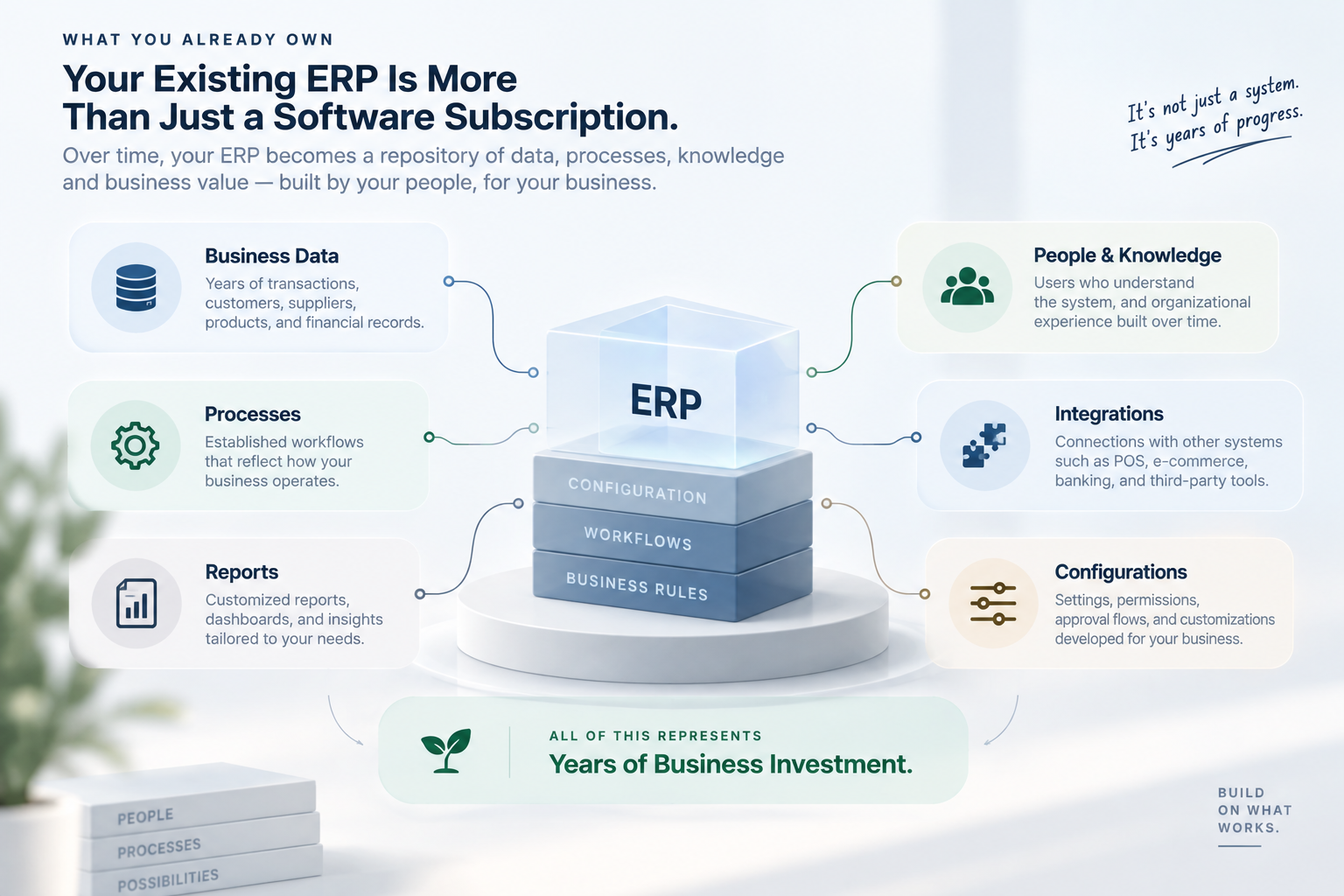
One of the easiest things to overlook is everything the business has already built around an existing ERP.
An ERP that has been running for years may contain far more value than its current software fee suggests.
It may already include:
Business data
Years of transactions, customers, suppliers, products, pricing, financial records, and operational history.
Business processes
Established workflows that users understand and follow.
System configuration
Settings, permissions, approval flows, document structures, reports, and other configurations developed over time.
Integrations
Connections with accounting systems, POS systems, warehouses, e-commerce platforms, banking systems, or other business applications.
User knowledge
Employees who already know how to perform their daily work.
Organizational experience
People who understand what the system can do, where problems occur, and how to resolve them.
All of these represent accumulated business investment.
Replacing the ERP does not automatically preserve that investment.
Some of it has to be migrated.
Some has to be rebuilt.
Some has to be redesigned.
And some may simply be lost.
Is the ERP Broken — or Is the Implementation?
This is one of the most important questions to ask.
When employees complain about an ERP, the immediate conclusion can sometimes be:
“The ERP isn't good enough.”
But the real problem may be somewhere else.
Perhaps:
- The system was never configured properly.
- Users were never fully trained.
- Existing features are not being used.
- Business processes became unnecessarily complicated.
- Reports were designed around old habits.
- Data quality has deteriorated.
- Integrations were poorly designed.
- Manual workarounds were created over time.
- The company changed, but the ERP configuration did not.
In these situations, replacing the software may solve some problems—but it can also carry the same problems into a new system.
A new ERP does not automatically create a new business process.
If the organization carries the same unnecessary approvals, spreadsheets, manual workarounds, duplicate data entry, and unclear responsibilities into the new system, the company may simply create a newer version of the same problem.
This is why ERP optimization should happen before replacement is automatically considered.
Sometimes the System Has More Capability Than the Business Is Using
Another situation we frequently encounter is underutilization.
A company may believe that its ERP is missing functionality when, in reality, the functionality already exists but is not being used effectively.
For example:
“We need another spreadsheet to manage this.”
Maybe.
Or perhaps the ERP already has a reporting or workflow capability that was never configured.
“We need another system to handle this process.”
Maybe.
Or perhaps the existing ERP can support the process with better configuration or integration.
“The ERP cannot do this.”
Perhaps it cannot.
But before making that conclusion, it is worth understanding exactly what the system can do.
This is where a proper assessment can be more valuable than immediately starting an ERP selection process.
The Real Cost of Starting Over
Imagine two ERP options.
Option A — Continue and Optimize
The business already has:
- An implemented ERP
- Existing historical data
- Established processes
- Trained users
- Existing reports
- Existing integrations
- Existing configurations
- Existing operational knowledge
The business may still need investment in upgrades, support, improvements, integrations, or process optimization.
But the foundation already exists.
Option B — Replace
The business may need:
- New software
- New implementation
- New configuration
- Data migration
- Data cleansing
- New reports
- Integration redevelopment
- Testing
- User training
- Documentation
- Process redesign
- Change management
- Internal project resources
- Post-go-live support
The new ERP may eventually provide significant benefits.
But those benefits need to justify the cost of getting there.
This is why ERP replacement should be evaluated as a business transformation project, not simply as a software purchasing decision.
What Happened in Our Client Engagement?
In one client engagement, we encountered exactly this kind of situation.
The company had been using an SAP ERP system since 2018.
The system was already established within the organization. Users were familiar with it, business processes had been built around it, and the system was supporting ongoing operations.
At the same time, another ERP platform appeared attractive because its software cost was lower.
On paper, replacing the existing system seemed capable of producing annual savings.
But the comparison became more complicated once we looked beyond the software price.
The existing ERP represented years of implementation, configuration, data, process development, user familiarity, and operational experience.
A replacement would mean starting another implementation cycle.
That meant asking questions such as:
What would need to be migrated?
Which reports would need to be recreated?
Which integrations would need to be rebuilt?
How much user training would be required?
Which business processes would change?
How much internal time would the project consume?
And perhaps most importantly:
What business problem would the new ERP solve that could not be solved by improving the existing one?
That last question is critical.
Because if the primary reason for replacement is simply that another ERP has a lower annual software cost, the business may not yet have a complete business case for replacement.
A Better Way to Compare ERP Options
Instead of comparing only annual software costs, compare the business case over time.
A useful comparison can look like this:
The purpose of this table is not to automatically favor the existing ERP.
It is to make the real comparison visible.
A replacement can absolutely create more value.
But that value needs to be identified.
When ERP Replacement Actually Makes Sense
There are situations where replacing an ERP is not only reasonable, but necessary.
For example, replacement may deserve serious consideration when:
The ERP no longer supports the business
The company's operations have evolved beyond what the existing platform can reasonably support.
The system creates more work than it removes
Employees depend heavily on spreadsheets, manual reconciliation, duplicate data entry, and workarounds because the ERP can no longer support essential processes effectively.
The cost of maintaining the system keeps increasing
Maintenance, customization, infrastructure, support, and integration costs may eventually make continued operation unattractive.
The technology has reached a practical limit
The system may be approaching the end of its supported lifecycle, creating significant technical, security, infrastructure, or compliance concerns.
The business needs a fundamentally different capability
Sometimes the goal is not simply to replace software.
The company may be entering new markets, consolidating multiple entities, changing its operating model, or pursuing a transformation that the current ERP cannot reasonably support.
In these situations, replacement can create a compelling business case.
The key is that the business has a reason to replace the ERP beyond simply finding a cheaper software subscription.
Five Questions to Ask Before Replacing Your ERP
Before starting an ERP replacement project, ask these five questions.
1. Does our current ERP actually fail to meet our business needs?
Identify the specific gaps.
Not:
“Users don't like the system.”
But:
“Which business requirements cannot the system currently support?”
2. Is the problem caused by the software—or by how we use it?
Separate system limitations from:
- Process problems
- Configuration problems
- Training gaps
- Data quality problems
- Integration problems
- User habits
3. What would we have to rebuild?
Map everything that already exists.
Data.
Reports.
Integrations.
Workflows.
Configurations.
Documentation.
User knowledge.
Business processes.
Then estimate what it would take to reproduce or improve each one.
4. What is the total cost over the next five years?
Don't compare one year's subscription against another year's subscription.
Compare the broader cost of ownership and implementation over a reasonable planning horizon.
SAP's ERP ROI framework specifically recommends looking at the costs and benefits of both systems over a multi-year period and accounting for implementation, data conversion, training, infrastructure, software, and ongoing personnel costs.
5. What business value will the replacement create that optimization cannot?
This may be the most important question.
If the new ERP costs more but enables significant business improvements, the investment may be justified.
But if the primary benefit is only:
“We save a few million rupiah per year on software,”
then it is worth calculating how long those savings would take to offset the cost and disruption of replacement.
Rescue Before You Replace
At SDN, we believe an ERP decision should start with the business problem—not the software brochure.
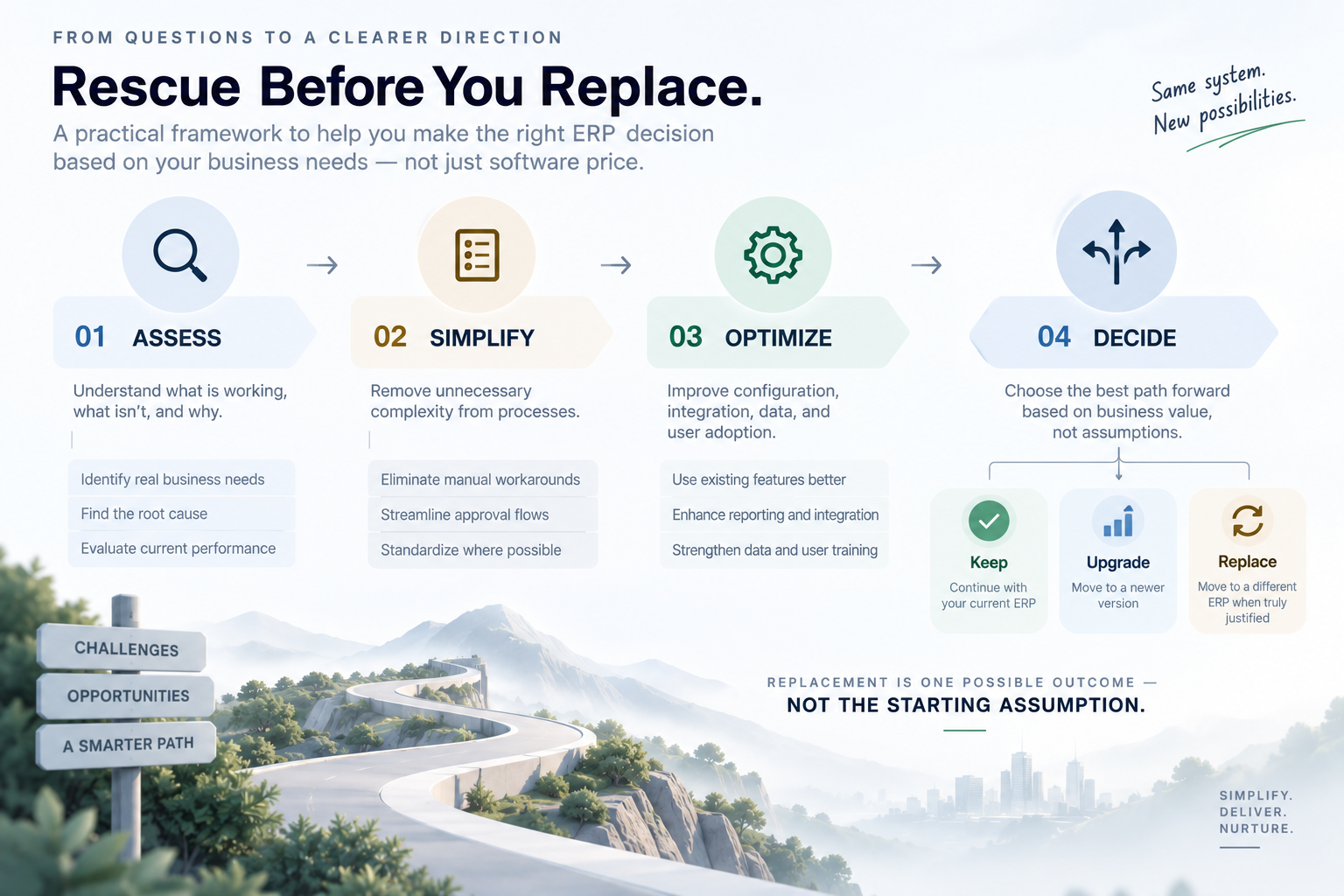
Our approach can be summarized simply:
ASSESS
Understand what is working, what is not, and why.
SIMPLIFY
Remove unnecessary complexity from processes before trying to reproduce them in another system.
OPTIMIZE
Improve configuration, workflows, reporting, integrations, data, and user adoption where possible.
DECIDE
Only after understanding the real gaps should the business decide whether to continue, upgrade, optimize, or replace.
This approach does not assume that the existing ERP is always the right answer.
It simply makes sure the decision is based on evidence rather than assumption.
The Goal Isn't to Keep the Old ERP. It's to Make the Right Business Decision.
An ERP replacement can absolutely be the right decision.
But a lower software price is not, by itself, a business case.
If your existing ERP is stable, understood, and capable of supporting the business, the first question should not necessarily be:
“What cheaper ERP can replace it?”
It may be:
“What would it take to make the system we already have work better?”
Sometimes the answer will still be a new ERP.
Sometimes it will be better configuration.
Sometimes it will be process improvement.
Sometimes it will be better integration.
Sometimes it will be improved training and user adoption.
And sometimes, the existing system simply needs to be used more effectively.
A stable ERP should earn its replacement—not be replaced simply because another ERP has a lower subscription price.
The smartest ERP decision is not always about starting over.
Sometimes, it is about rescuing what already works.
Reference
SAP, Calculating the ROI in ERP: Legacy ERP vs. a New ERP System? The framework recommends comparing complete costs and benefits across the existing and replacement systems over a period of at least five years. SAP ERP ROI calculation worksheet
How SDN Can Help
Considering an ERP replacement?
Before committing to a new system, SDN can help you assess the current situation, identify the actual business gaps, evaluate optimization opportunities, and build a clearer business case for the next step.
Whether the right answer is optimize, upgrade, integrate, or replace, the decision should start with the business problem.
Let's solve the business problem before choosing the software.
SDN — Simplify. Deliver. Nurture.